

I wrote this review six months after switching to Cloudways, but in total, I spent two full years hosting my sites with them.
In this Cloudways review, I walk you through the challenges that pushed me to try Cloudways. Things that improved after the switch, and the performance gains I saw once everything was moved.
I’ll also show you how this site performed before and after migrating. So you can see how much difference the right hosting can make for your traffic and your business.
If you’re thinking about switching to a managed hosting service but aren’t sure which one to choose. This breakdown of my two-year experience with Cloudways should help you decide.
And if you want to see how it compares to my previous host. I also have an in-depth comparison of Cloudways vs. Namecheap you can read later.
Let’s get into the details.
Cloudways

I’ve used Cloudways for 2 years on real sites. In this Cloudways review, I break down its speed, pricing, features, support, and everything you to know.
Price: 14
Price Currency: USD
Operating System: Web
Application Category: Hosting
4.27
What is Cloudways?
Cloudways is a managed hosting provider offering comprehensive support and services for website management, including automated updates, responsive support, and optimized load speeds.
It provides fast, feature-rich, scalable hosting and responsive 24/7/365 customer support services.
It is a middleman between users and cloud infrastructure providers like Google Cloud, Amazon, Linode, Vultr, and DigitalOcean. It is a cloud host for various applications like WordPress, Joomla, PHP, Magento, and WooCommerce.
Cloudways simplifies hosting web applications on cloud infrastructure, making it an attractive option for beginners who prefer simple and managed hosting services without server-side management.
Built for digital marketing agencies, small businesses, e-commerce websites, and marketers with growing needs for fast-loading page time. Including 99.99% uptime, dedicated workflow, powerful web analytics, and advanced web security, and Cloudflare Enterprise add-ons.
Reasons Why I Switched to Cloudways
As my blog grew in traffic, my shared hosting plan couldn’t keep up. Upgrading to a higher plan with slightly more RAM and CPU (0.75 Core and 768 MB RAM) still didn’t resolve the issues I was facing.
Here’s what pushed me to switch:
While my previous host was serviceable, it lacked the speed, reliability, and flexibility I needed.
My attempts to fix CWV and performance issues were unsuccessful, and the inability to test popular caching solutions like WP Rocket or NitroPack only added to the frustration.
After researching alternatives, I considered WPX, Kinsta, and Pressable, but Cloudways stood out. It consistently ranked highly in online polls and had glowing reviews from real users.
Not:
Check out my detailed comparison of Kinsta and Cloudways for in-depth information about the two web hosts. For a WordPress-focused web host, learn more about Kinsta vs Pressable or WP Engine vs Pressable.
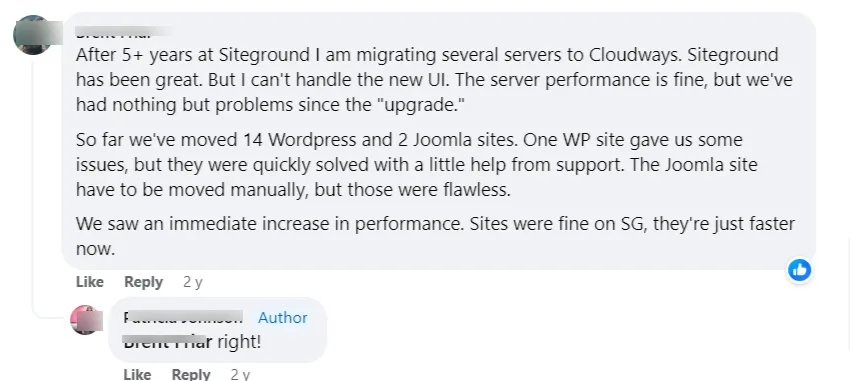
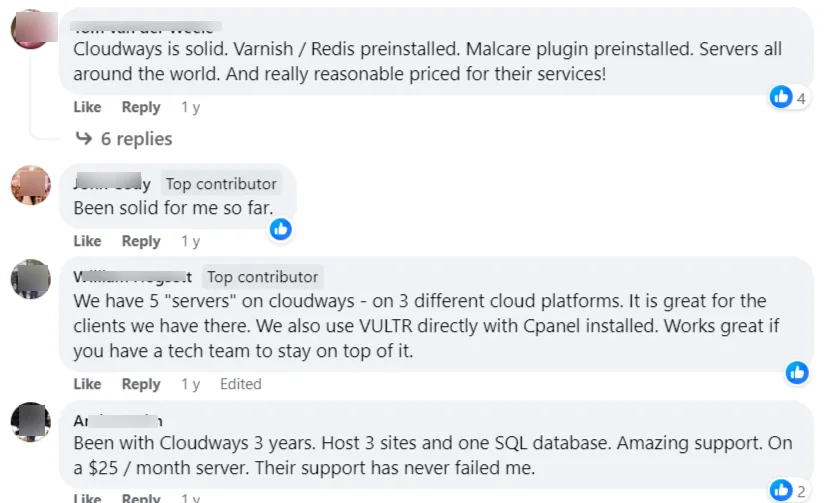
Many praised Cloudways for its speed, reliability, and excellent customer support, often outperforming competitors like SiteGround and WPX.
I decided to go with Cloudways’ DigitalOcean server. The signup process was straightforward, including account verification with two-factor authentication and credit card confirmation.
Once that was complete, I migrated my site without delay.
Next, let’s explore Cloudways’ advanced features, pricing, ease of use, and tech support.
Ease of Use
Cloudways prioritizes user experience, making its dashboard intuitive and easy to navigate. From signup to launching your first server, every step is designed for simplicity, though support is readily available if needed.
Here’s a quick overview of the process:
Sign Up and Launch a Server.
After signing up, you’ll launch a server and deploy your web application. Cloudways supports a range of platforms, including WordPress, Laravel, PHP, Joomla, WooCommerce, Custom Apps, and Magento.
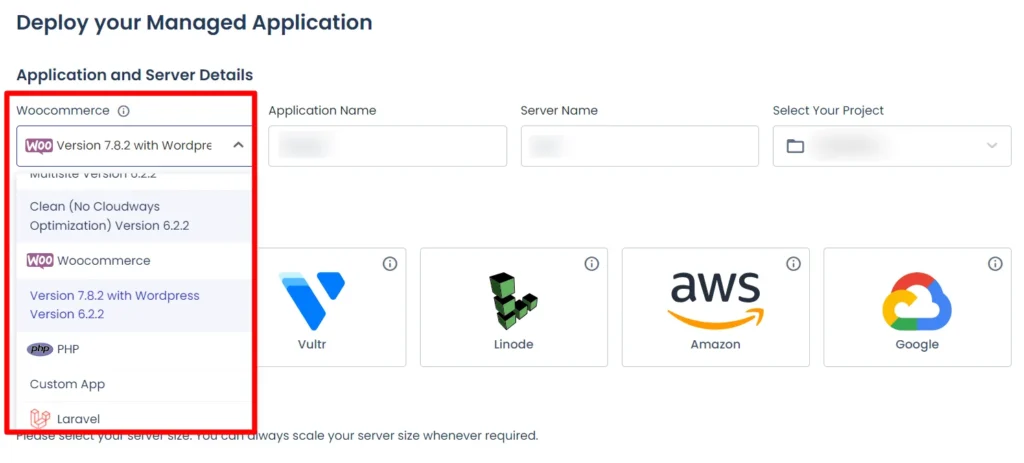
Choose a Cloud Provider
Cloudways partners with five major cloud hosting companies:
When setting up your server, you’ll select:
Once you’ve configured your options, click “Launch Now.” Your server and application will be installed, and you can begin building your website.
The Cloudways dashboard focuses on two main areas:
This user-friendly approach ensures you can efficiently manage your hosting environment while focusing on your website’s growth.
Server Management.
Hover on the side panel to reveal this and other functions within your Cloudways dashboard.
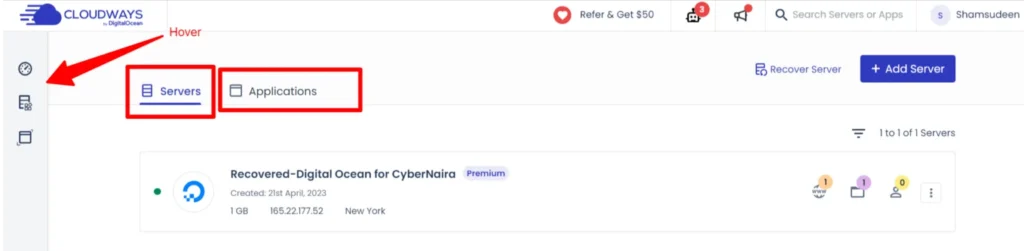
Assuming you want to access server-side management settings, you must click the Servers tab function.
When you do this, it will open up the settings and allow you to manage server configurations like:
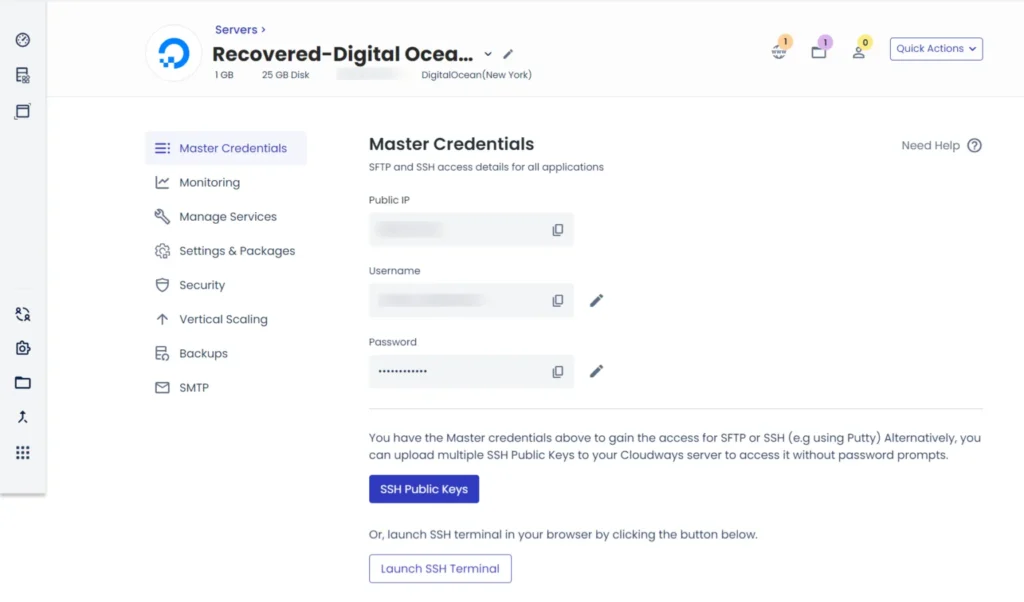
These settings allow you to manage all that concerning server-level tasks and management.
You can have multiple servers within a Cloudways account; no limit is imposed.
Web Applications Management
The application tab lists all your web applications deployed with Cloudways servers. For example, if you have WordPress sites on a server, they will be listed under the Application tab.
Clicking on an application within the list opens up its settings and configurations. This is where you access application-level settings such as:
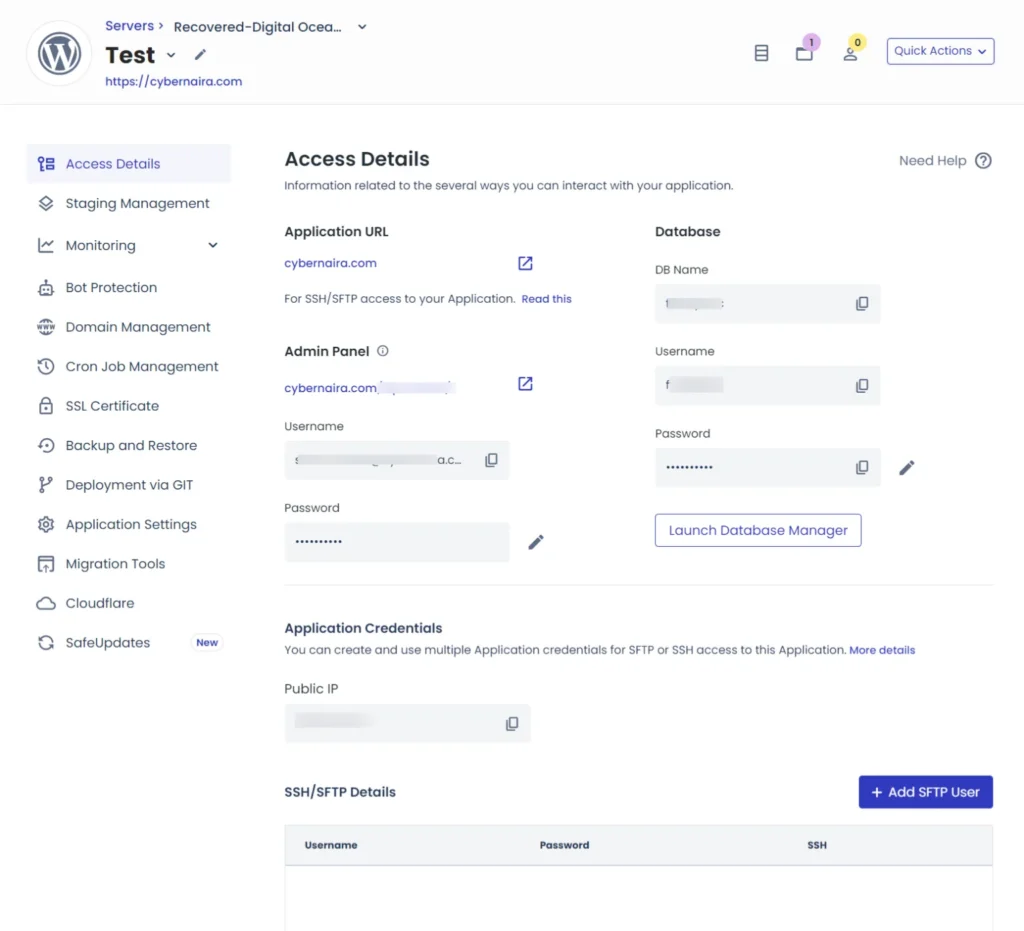
Note: You can host multiple websites if your server size, bandwidth, RAM, and CPU usage accommodate it. There is no restriction on the number of sites you can install on a server.
Other notable Functions
Cloudways has additional settings for managing your hosting account and adding more features. Hovering on the side draw-out panel reveals other accessible functions.
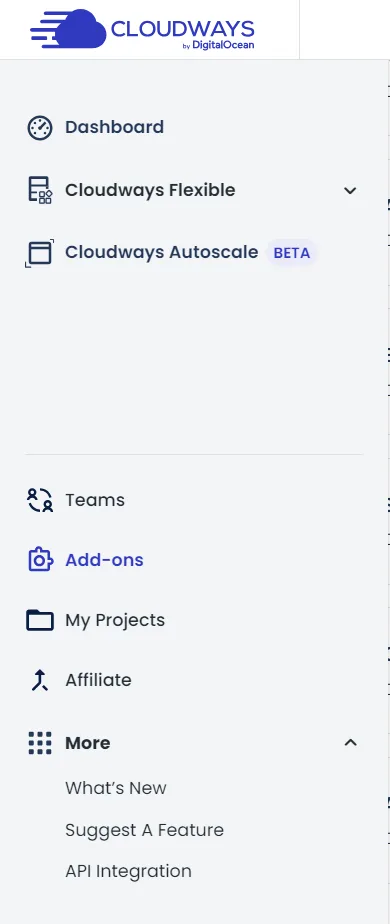
Here, you can access the Cloudways add-ons, which include a free Astra Pro theme license for one year. Other add-ons include Elastic Email, Rackspace Email, Application migration, DNS Made Easy, Cloudflare CDN, Support add-on, and Safeupdates.
Cloudways Key Hosting Features
The Cloudways features include various aspects of website management, from its customized control panel to applications and multiple servers stack and relevant partnerships; the platform delivers excellent hosting solutions.
Here, we look at the web stack deployed on your Cloudways server.
Server Stacks
For Cloudways users after November 2nd, 2023, Debian 11, “Bullseye,” a free and open-source Linux operating system, serves as the foundational OS upon which all other Cloudways stacks are built and deployed.
Your Cloudways server stack consists of the following components:
The server settings management service page contains all the core services on your server. You can restart, turn off, and activate a service at will, but be careful not to break your site.
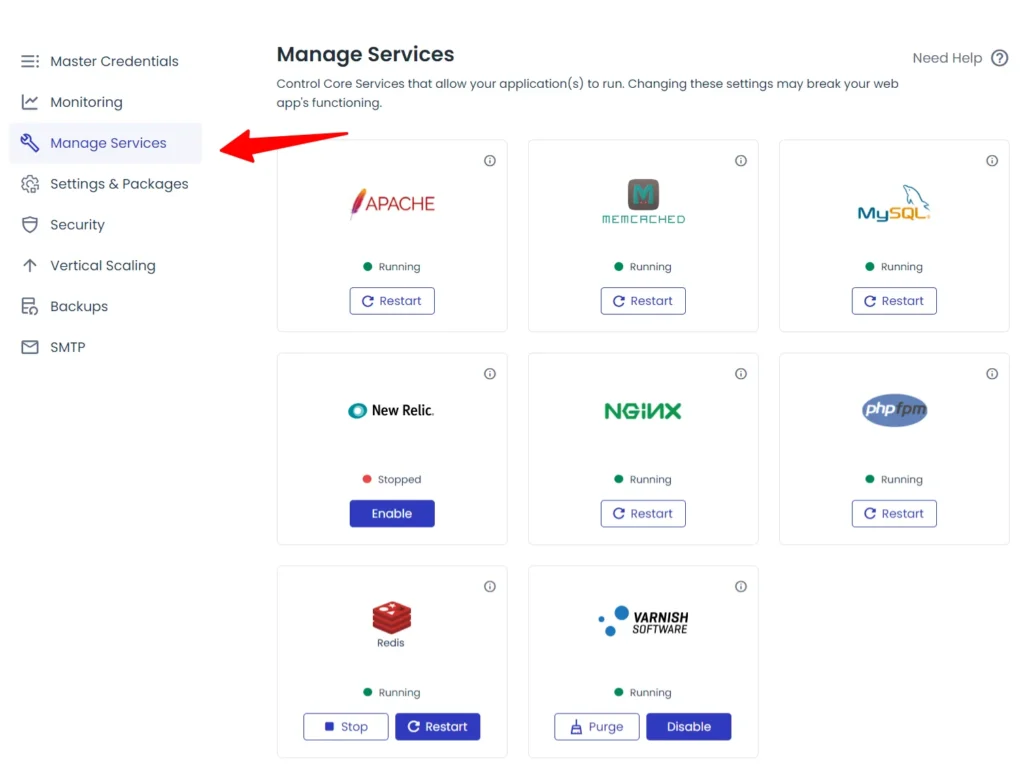
If you don’t know what a service means or its function, please leave everything as it is.
Cloudways Autonomous
Cloudways recently launched Cloudways Autonomous, a hosting solution for high-traffic WordPress sites. It eliminates the hassle of managing hosting resources, letting businesses focus on growth.
This hosting service automatically scales resources like CPU, RAM, and storage based on traffic and server demand.
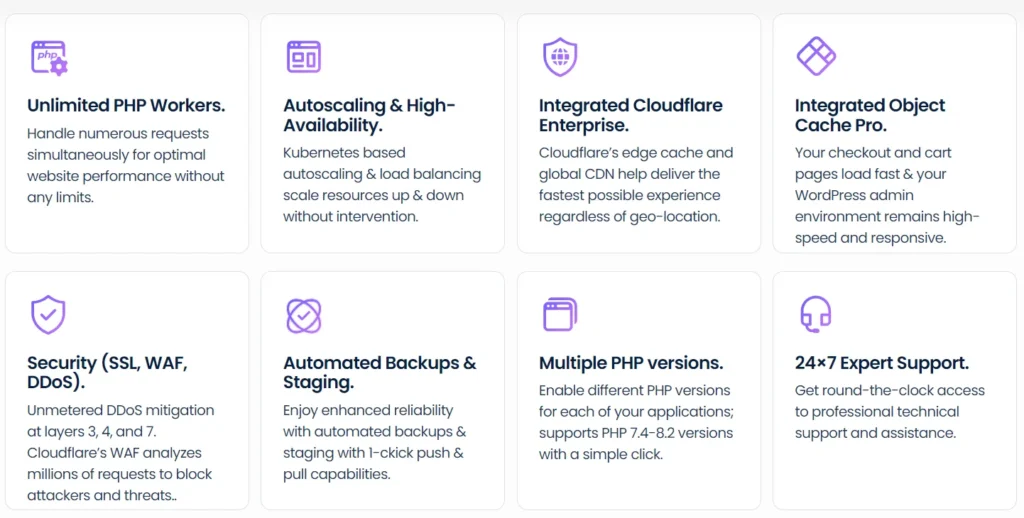
Powered by Kubernetes infrastructure, it uses advanced load-balancing technology with server redundancy and failover mechanisms, ensuring 99.99% uptime and uninterrupted performance, even during traffic spikes or viral events.
With Cloudways Autonomous, you don’t need to monitor or adjust server resources manually. The system handles everything, maintaining speed and reliability regardless of the number of users.
The plan also includes Cloudways CDN, which is integrated with Cloudflare Enterprise. This adds advanced web security, global CDN services, Edge page caching, and performance optimization.
Cloudways Autonomous is an ideal choice for large eCommerce sites, marketing agencies, mission-critical platforms, or any business that requires scalable hosting without hands-on management.
For more details, including pricing and traffic limits for each package, visit the Cloudways Autonomous hosting page.
Cloudflare Enterprise
While briefly mentioned above, it is worth exploring how the Cloudflare Enterprise solution improves your site’s performance, security, multiple caching layers, and user experience.
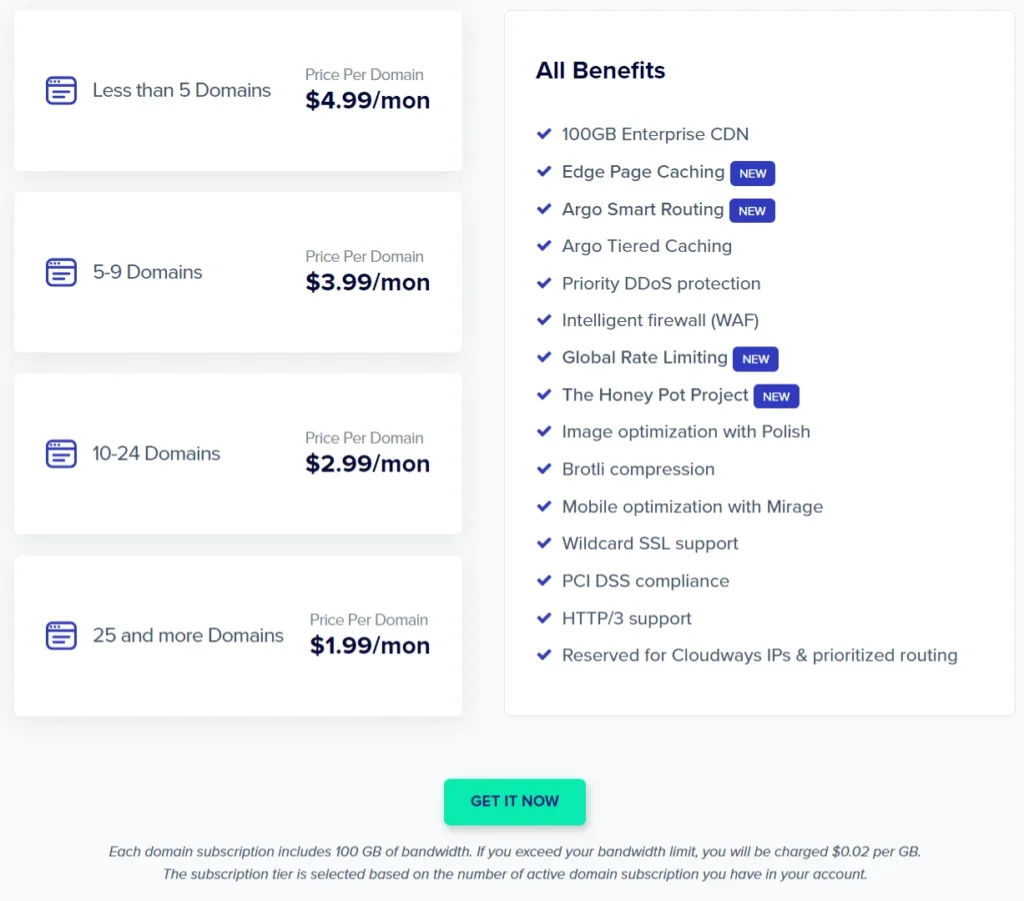
Hosting with Cloudways means enjoying the Cloudflare Enterprise addon at a discounted rate.
Note:
Imagine how much you’re saving on Cloudflare Enterprise, considering Cloudflare Pro and the Business plan cost $20 and $200 monthly when billed for the annual plan. In addition to saving, you also enjoy Global load balancing, prefetching URLs, Enterprise DDoS mitigation, Custom cache key, and Cache by tag or host, which are features included in Enterprise but not in Pro or the Business plan. Learn more about Cloudflare integration with Cloudways here
It comes with Cloudflare Agro Smart Routing, enterprise-level DDoS attack mitigation, WAF (Web Application Firewall), Global Rate Limits, and HoneyPot security, which stops malicious bot traffic before it reaches your website server.
The Cloudflare Enterprise add-on also includes Edge Page caching, which provides a caching mechanism and multiple caching layers for the entire website. This allows your WordPress website to be cached at Cloudflare Edge and improve its Time to FirstByte (TTFB) in all locations.
In addition, Cloudways integrates Cloudflare global enterprise CDN, Image, and mobile optimization with Polish + Mirage, compresses, resizes, and optimizes images for mobile devices, serves WebP image format for compatible browsers, and strips exit gif data.
It also has Brotli compression to provide enterprise-grade performance for your applications.
It does not stop there; Cloudflare Enterprise also enables ScrapeShield and file minification settings to add more hosting performance and security layers to your applications.
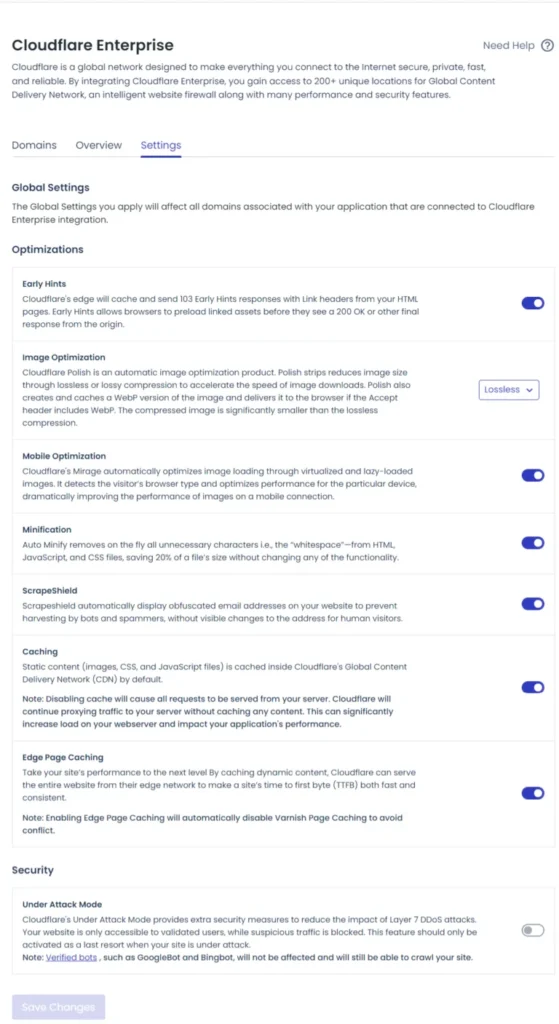
These applications, settings, or software are constantly running on your server or application to ensure 24/7/365 quality hosting service.
Object Cache Pro
Another significant benefit of hosting with Cloudways is the partnership with Object Cache Pro, which comes free with your hosting. Object Cache Pro is a premium WordPress caching plugin that costs $95 monthly.
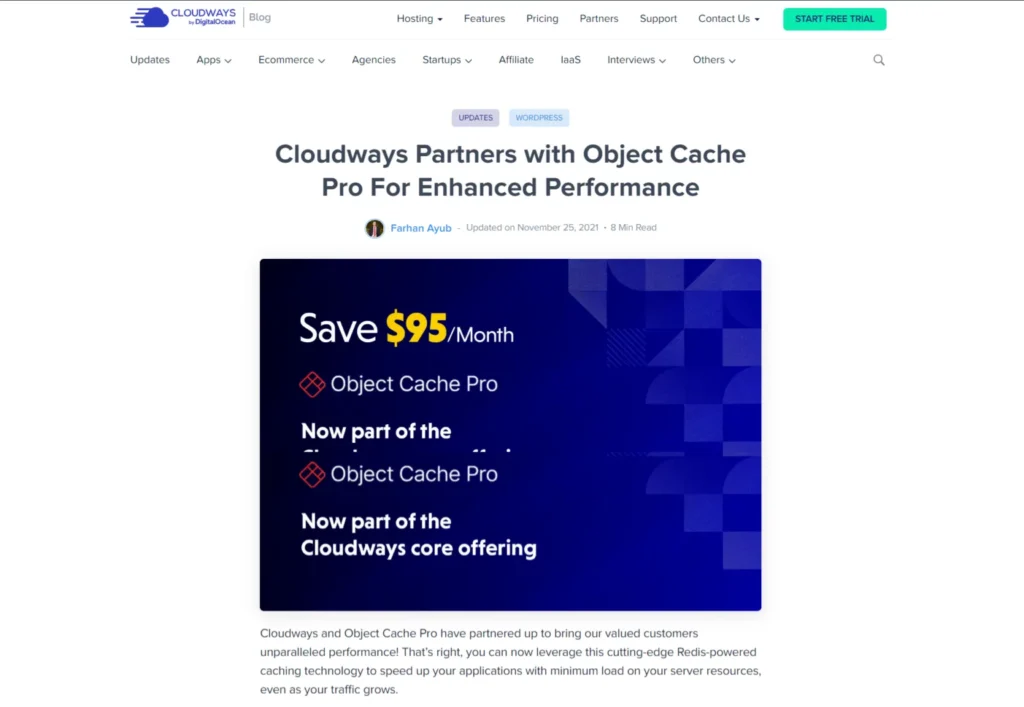
The plugin is advanced or superior to Redis, improving cache performance and resource usage. It is optimized to work with WooCommerce, Jetpack, Yoast SEO, and WordPress.
Note:
Cloudways automatically installs Redis as a drop-in plugin in your WordPress plugin list, so you do not need to install and activate it manually. Check the WordPress drop-in plugin tab for confirmation.
Object Cache Pro mainly improves the logged-in user experience, dynamically generates pages, improves database queries and performance, and effectively speeds up WordPress performance.
Luckily, you don’t have to pay extra to use Object Cache Pro. It is free for every Cloudways subscriber with a 2GB server size or more. This is a significant advantage for WordPress users who host with Cloudways.
You’re sure your site is optimized with every possible cutting-edge caching, compression, and performance technology.
Cache Performance and Security Analytics
Cloudways offers a comprehensive dashboard for monitoring Cloudflare add-on performance and security analytics. Here’s a breakdown of the critical metrics available:
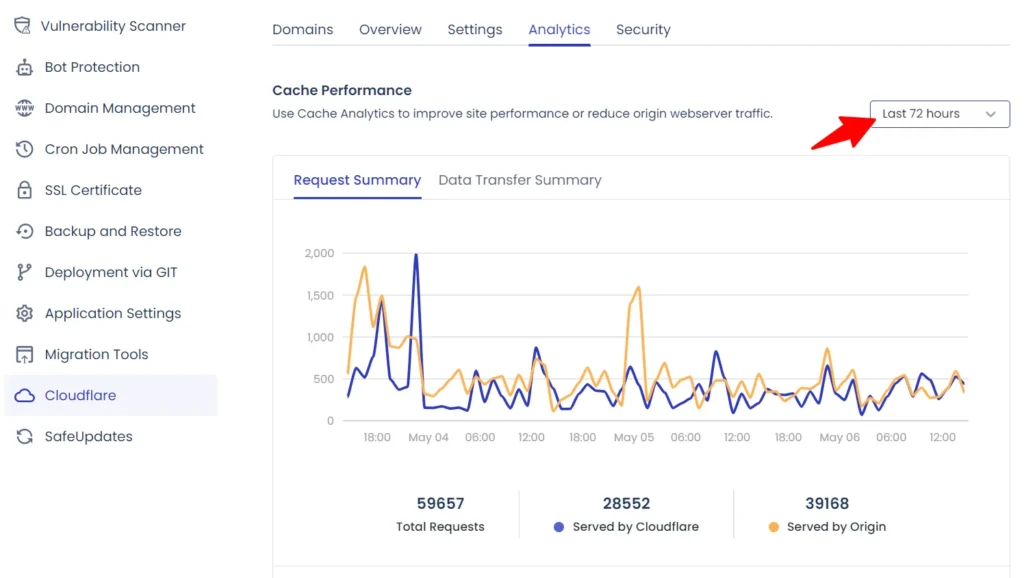
Cache Performance Metrics
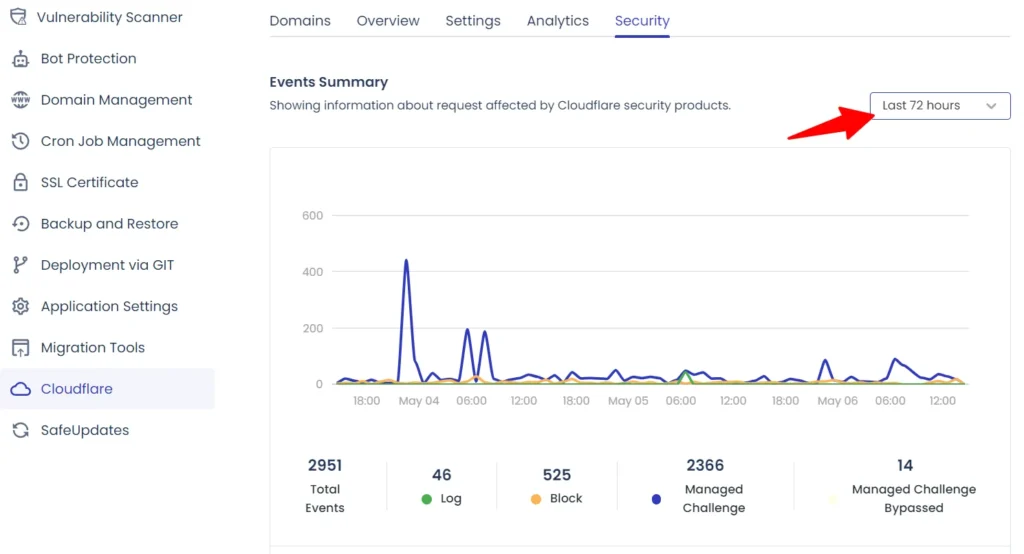
Security Analytics
Note: Data logs for cache and security analytics are available for the last 72 hours.
Additional Features
Cloudways provides a wide array of tools to enhance website management and performance:
These tools make Cloudways a robust choice for managing websites with reliability and performance at the forefront.
You can check the full Cloudways features via this page.
Cloudways Hosting Performance Test
Unlike many other articles reviewing Cloudways, which use a demo or test site to show performance results, this article relies on practical experience with a production site, where I managed to grow my business and earn a living.
This site has 250+ published articles, thousands of images, 14 active plugins, and several other resources.
So, this Cloudways review is not based on experimentation but on a live site I managed.
If you’ve been following through, do you remember the website performance issues I mentioned with the Namecheap Shared hosting plan?
After migrating to Cloudways, the first impact I noticed was faster web pages. This is even before I install WP Rocket or activate the Cloudflare enterprise add-on features.
I use the DotCom Web Server Performance Testing tool. Testing from four different user locations shows a faster server load time of 450 milliseconds.
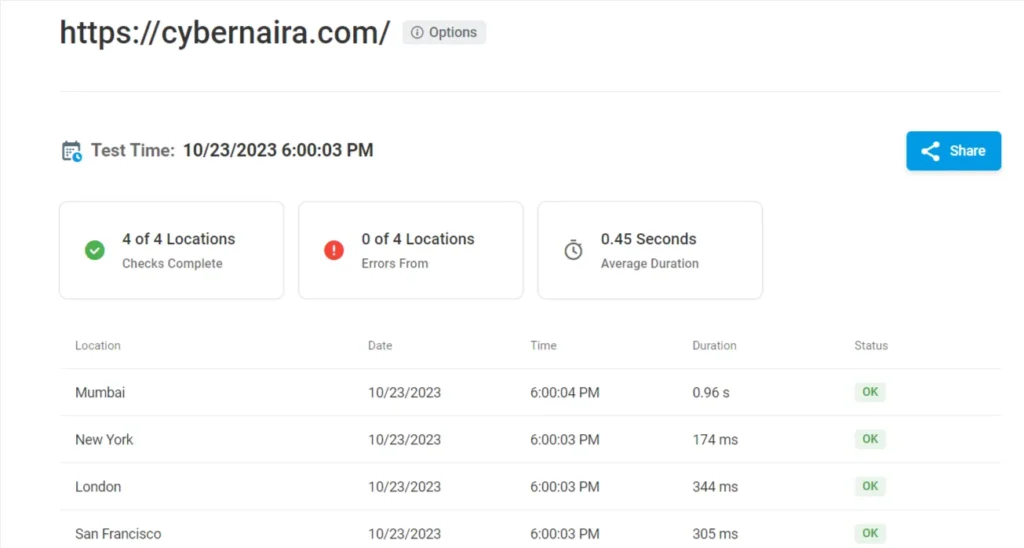
Namecheap shared hosting server averaged 790 milliseconds, fast but slower than Cloudways.
Another significant improvement is the “HTTP 429 many request error” warnings. Since I migrated to Cloudways, this error has never resurfaced.
The connection timeout is also gone. Users no longer see the connection timeout error page when accessing my website pages.
Most importantly, the site web pages now have good scores on Google Core Web Vitals testing tools. Here is what most web pages average when testing with Pagespeed Insights and GTmetrix.
Mobile Test.
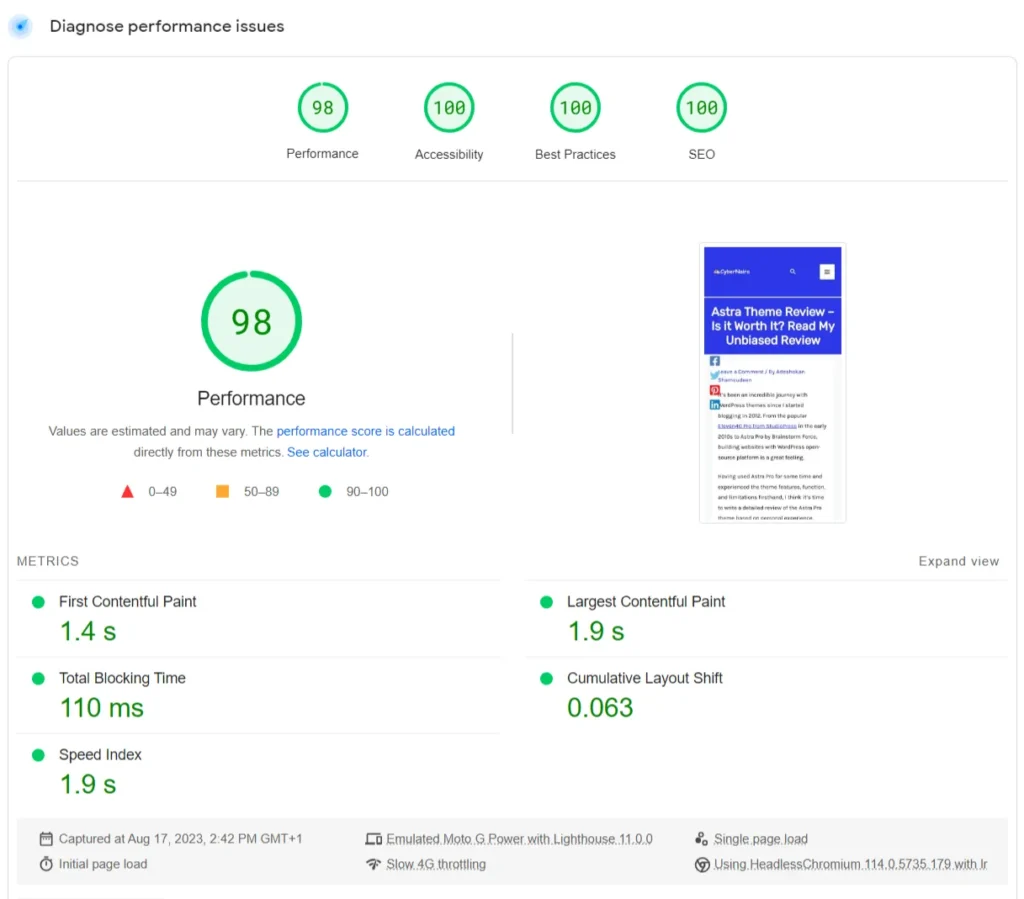
Desktop results
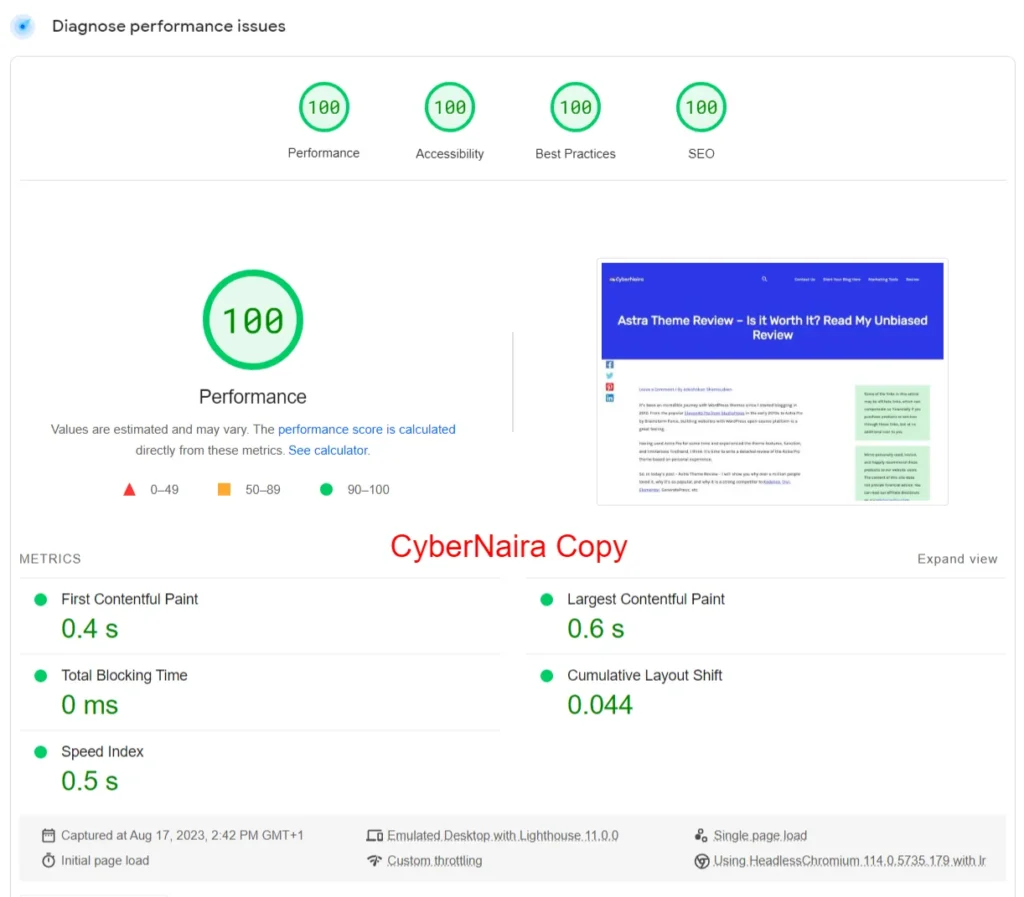
It is not good if the improvement in performance and speed does not translate to more traffic from Google.
Here is a comparison of the traffic data for the last six months of the Search Console.
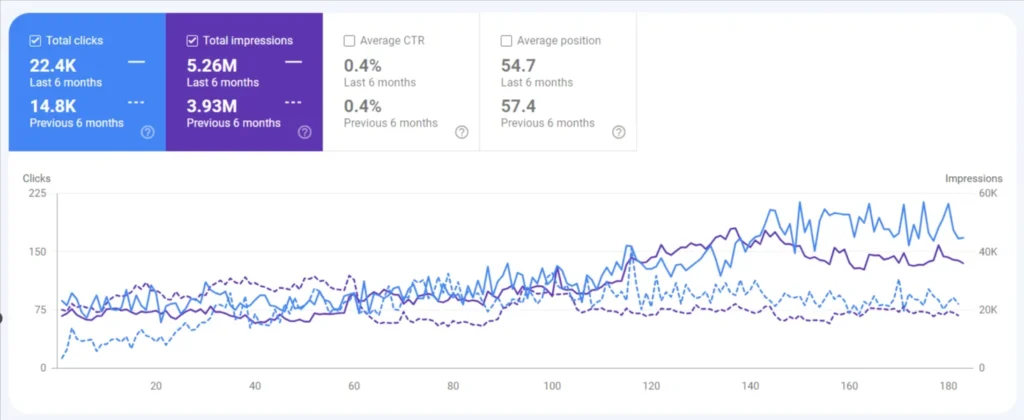
For more data accuracy, I signed up for Cloudways on April 21st, 2023, and am writing this review of Cloudways on October 23rd, 2023.
That’s exactly six months of using the platform before writing this Cloudways review.
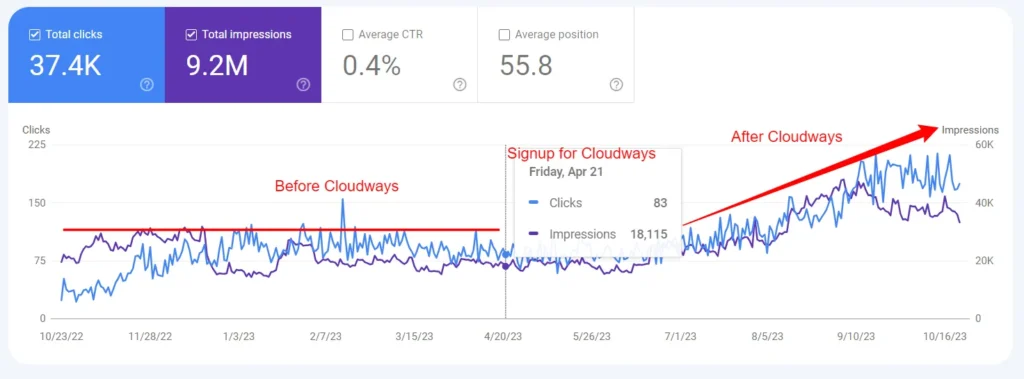
The graph shows the traffic trend flattened in the first six months. After Cloudways, things show signs of improvement and an upward traffic trend.
Certainly, hosting isn’t the only factor for the upward traffic trends; other site optimizations and improvements were made, like installing WP Rocket and switching from Astra Pro to WP Kadence.
A poor web host will not help your other optimization efforts have noticeable impacts, if any.
You should read my review to learn why I switched from Astra Pro to WP Kadence and how it helped resolve the site’s Cumulative Layout Shift.
Here’s what I recommend for faster website pages: sign up for Cloudways and get WP Rocket. The combination can be the difference between a site that loads slowly and a speedy one.
Cloudways Customer Support
I believe support is one of Cloudways’ strengths or areas in which it excels as one of the best cloud hosting companies. The support has been responsive, timely, and supportive on every occasion I have requested help.
However, you must understand the scope or specifics of Cloudways customer support services.
While the Cloudways support team offers free 24/7 live chat support for all its customers, the support can only look at certain things based on your level of support.
Cloudways has three levels of support:
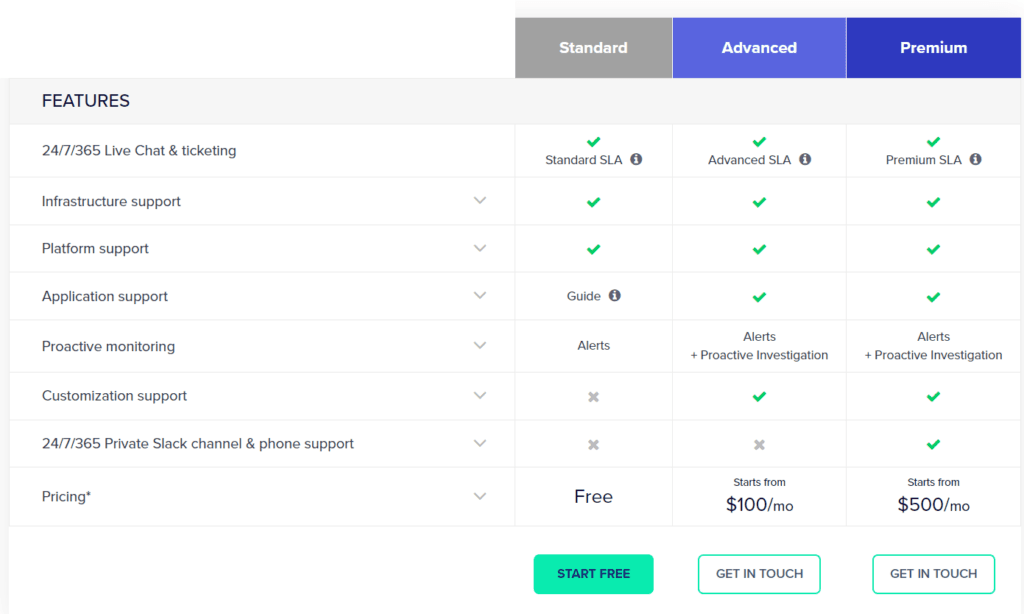
For example, standard support does not include applications and proactive resolving of server or stack-related issues.
Standard support users can request technical support for the servers and the platform Cloudways provides.
Only Premium and Advanced support users can request technical support for applications installed on Cloudways servers.
This means that if you have issues with your WordPress application relating to the blog and require support, Cloudways will only point you to guides on their blog, which offers extensive knowledge-based articles and guides.
However, if the problem is related to servers or the Cloudways platform, you will receive all the support required to resolve it.
Cloudways sometimes offers application support for Standard users. I have requested help several times, and it was quickly looked into.
You can check the extra bucks required to purchase Advanced and Premium support add-ons on the page if you need such a tech support level.
Cloudways Pricing
Cloudways’s DigitalOcean server offers the cheapest hosting plan in terms of reasonable price and hosting specifications.
It starts at $11 monthly or $0.0153 hourly and offers 1GB Core, 25GB SSD storage, 1GB RAM size, and 1TB bandwidth.
Other cloud infrastructures cost more and offer more hosting resources for the starter plan.
Amazon Web Server costs $38.56 with 2GB RAM, vCPU 2, 20GB storage, and 2TB bandwidth. On the monthly billing option, Google Cloud’s entry-level plan costs $37.45, giving you 1.7GB RAM, 1 vCPU, 20GB Storage, and 2TB bandwidth.
Choosing your preferred billing option is one of Cloudways’s advantages over competitors. Cloudways lets you choose the billing methods that suit your budget. Hourly or monthly? Choose which option you want.
The hourly billing is ideal if you want to launch a marketing campaign for a few days or weeks. Otherwise, monthly billing is the best option.
Check the pricing page for a complete hosting plan and price breakdown.
Things to Know About Cloudways
Certain things about Cloudways services might improve your user experience or help you prepare to use the platform.
File Manager/cPanel
Cloudways does not have a file manager. For users who are used to having cPanel with File Manager, Softaculous, and others, you’ll need to connect to your web server using an SFTP program like FileZilla.
Master credentials for SSH or SFTP servers can be found on your server settings page. If you need to get the required connecting port to the server, ask the Cloudways customer rep.
Email Hosting
There is no email hosting, but I don’t see this as an issue. Generally, I advise keeping your website and email hosting separate.
If you need to migrate to another web host anytime, you don’t have to start configuring the email client to work with your new domain name server, which can be tedious.
I use Private Email with Namecheap for email hosting. Though Cloudways offers Rackspace and Elastic Email for a fair price, I haven’t used any. So, I have no experience discussing them.
Billing Structure or Plan
Your hosting prices are not fixed, and Cloudways does not have an annual billing plan; you’re billed month to month, depending on resource usage at the end of the month.
Cloudways sends invoice notifications during the first week of the following month. You must pay this invoice within a few days; otherwise, your application will stop working.
Funding your account before the due date is the best way to ensure that service is not interrupted due to unpaid invoices. Make sure you have sufficient funds to cover expected hosting costs.
Who Should Use Cloudways?
Cloudways, unarguably, offers excellent hosting services, high server performance, and good value for money. However, it might not be the right hosting choice for everyone.
There are instances or situations where Cloudways isn’t the ideal web host. You should consider other Cloudways alternatives with hosting features and plans that fit your budget, technical knowledge, and website needs.
Here are some ideal situations where Cloudways does not fit your plan.
Besides this, Cloudways is an excellent hosting provider if you’re looking for managed cloud hosting that provide good value for money.
However, if now is not the right time to try Cloudways, you should consider alternative web hosts, such as Hostinger, HostGator, LiquidWeb, and Kinsta, as well as shared hosts like Namecheap.
See my complete Kinsta review to learn more about its hosting plans, features, and pros and cons.
Cloudways Pros and Cons
Before signing up for Cloudways, let’s discuss its pros and cons.
Pros
Cons
FAQ – Cloudways Review
Is Cloudways Good for WordPress?
Cloudways is one of the best-managed WordPress hosting providers. In addition to its remarkable speed and uptime performance, Cloudways offers secure hosting and excellent user services.
Is Cloudways any Good?
The ability to scale your hosting resources as your website needs grow makes Cloudways suitable for any business size and needs. You can choose from the hourly, monthly, or annual plan. So you don’t have to be stuck to a long-term contract if you don’t need one.
Is Cloudways Good for eCommerce?
Cloudways offers businesses a simple interface to build with their choice of application: WordPress, Joomla, Drupal, Magento, PHP, or Laravel. Whether you’re an eCommerce site, shop, blog, agency, or small business owner, Cloudways can help you build your dream business.
How fast is Cloudways hosting?
Cloudways is faster than many other hosts, offering similar hosting packages and prices. If you’re a beginner, consider the Digital Ocean server. It is more affordable and provides the best value for money for blogs with low traffic.
Which Cloud Infrastructure Provider Does Cloudways Offer?
Cloudways provides five cloud service providers: DigitalOcean, Amazon Web Services, Linode, Vultr, and Google Cloud.
Can I Migrate Existing Blogs to Cloudways?
Yes, you can migrate your blog from other web hosts to Cloudways. WordPress users can easily use the Cloudways migration plugins to move their blogs without technical support. Other CMSs, like Joomla, can also be migrated to Cloudways for free. However, you should contact support if you’re migrating more than a single blog and require assistance from the Cloudways team.
Conclusion…
If managed cloud hosting is what you’re looking for, I advise you to check out Cloudways.
Cloudways hosting platform offers affordable plans for businesses of all sizes. From beginner-friendly plans to mission-critical website hosting needs.
Try Cloudways today.



Thanks for sharing this cloudways hosting post.It is very useful for me.Thanks again.keep sharing.
Thanks Maulik,
I’m glad you find it helpful.
its really amazing but i am using siteground hosting and i think its the best wp hosting
Hi Suhail,
Siteground is no doubt one of the industry’s best hosting platforms. However, there are many others with top-quality managed WordPress hosting solutions too. And Cloudways is just one of them, especially when it comes to cloud hosting.
Thanks.